Robots.txt Guide, Best Practices for Search & AI Crawlers
/ 7 min read

Summary
2. Order of Precedence in Robots.txt 3. Why Is Robots.txt Important in SEO? 6. Centralized Robots.txt Management 7. Robots.txt Is. The practical question is what this changes for SEO, content quality, and AI search visibility.
Managing how bots interact with your site used to be a straightforward conversation between you and a few major search engines. Today, that conversation has become significantly more crowded. With the rise of AI agents and LLM training crawlers, the stakes for your robots.txt file have shifted from simple "do not enter" signs to a strategic gatekeeping mechanism.
If you block the wrong bot, you might accidentally erase your presence from an AI's knowledge base or a search engine's results. Conversely, leaving the doors wide open on a large site can lead to "crawl waste," where bots spend their limited time on useless pages instead of your high value content. Understanding the nuances of these rules is the only way to ensure your server resources are used efficiently.
Understanding the Basics of Robots.txt
At its core, a robots.txt file is a plain text document located in the root directory of your website. Its primary purpose is to communicate to web crawlers which paths they are permitted to access and which they should avoid. It is not a security tool, but rather a set of instructions for well behaved bots. The same pattern also shows up in AI crawlers, where the practical question is how the signal becomes visible.
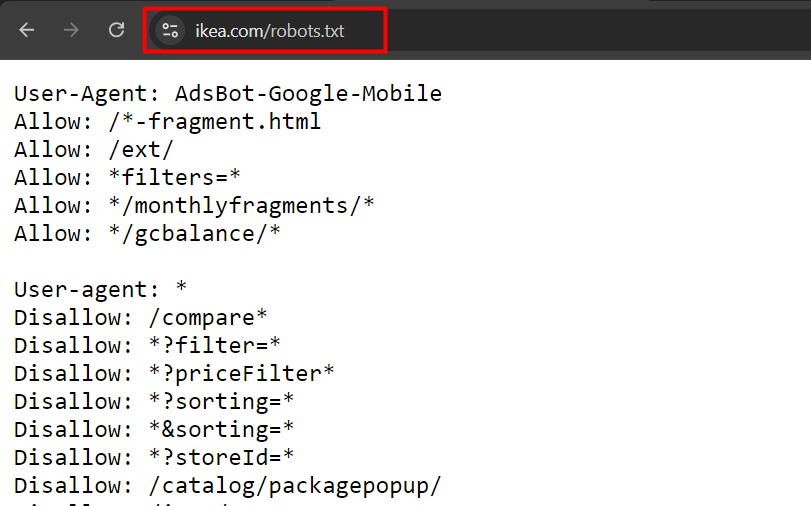
When working with this file, you need to be aware of a few technical constraints. First, robots.txt does not support complex regular expressions. You are limited to two primary wildcards: the asterisk (*), which represents any number of characters, and the dollar sign ($), which signals the exact end of a URL.
Another critical detail is case sensitivity. While the names of the directives and the user agent names themselves are case insensitive, the actual URL paths are not. For example, a rule blocking "filter=" will not stop a bot from crawling "Filter=".
Expert Interpretation: The biggest risk here is assuming the file is a "set and forget" asset. Because paths are case sensitive, a simple typo in a URL string can leave thousands of pages exposed to crawling. Always verify the exact casing of your URLs in your CMS before writing the rule.
How Search Engines Prioritize Conflicting Rules
Confusion often arises when multiple rules apply to the same URL. Search engines have a specific order of precedence to resolve these conflicts. The first rule is that specific instructions override general ones. If you create a dedicated block for a specific bot, that bot will ignore the general rules listed under "User agent: *".
Within a specific group of rules, Google generally follows two guiding principles to decide what to do:
The Most Specific Rule
Google prioritizes the rule that matches the greatest number of characters in the URL. If you have a broad rule that disallows a directory, but a more detailed rule that allows a specific subfolder within that directory, the more detailed rule wins. For instance, if you disallow "/downloads/" but allow "/downloads/free/", Google will crawl the "free" folder while ignoring everything else in the downloads directory.
The Least Restrictive Rule
In scenarios where two rules are equally specific in length, Google typically defaults to the least restrictive option. If you have two competing rules of the same length, one allowing and one disallowing the same path, the "Allow" directive will generally take precedence.
Expert Interpretation: This logic means you can "carve out" exceptions within blocked areas. The tradeoff is complexity; the more "Allow" exceptions you add to a "Disallow" block, the harder it becomes to audit your file for errors. I recommend keeping these exceptions to a minimum to avoid accidental exposure.
The Role of Robots.txt in Modern SEO
Many people mistake robots.txt for an indexing tool, but it is actually a crawl management tool. By blocking pages that provide no value to a searcher, such as privacy policies or internal administrative pages, you reduce the amount of wasted effort Googlebot spends on your site.
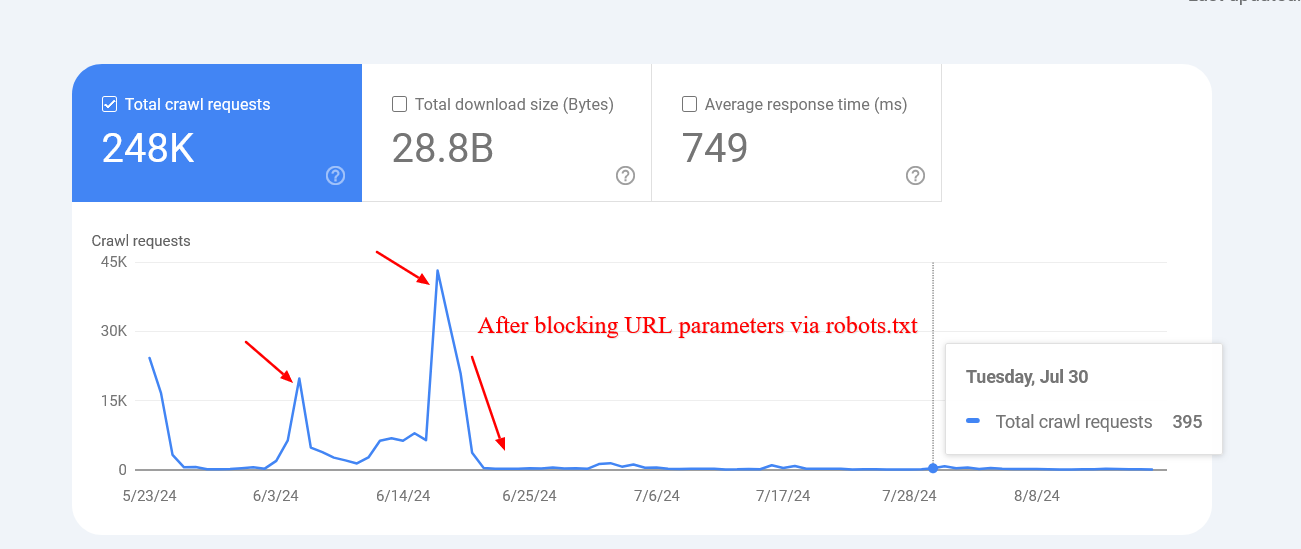
This is particularly vital for large scale websites. If you have an e-commerce store with thousands of products and complex filtering, you can inadvertently create an "infinite crawl space." This happens when bots find endless combinations of filter parameters, creating duplicate content and spiking server load without adding any SEO value.
While Google has noted that blocking pages doesn't automatically "transfer" crawl budget to other pages unless you've hit a capacity limit, it does reduce the strain on your server and contributes to a more sustainable web by reducing unnecessary computing power.
Expert Interpretation: The real value here is server stability. When a bot gets caught in a loop of faceted navigation, it can cause CPU spikes that slow down the site for actual human users. The decision to block should be based on whether a page provides unique value to a user arriving from a search engine.
Strategic Use Cases for Crawl Restrictions
Before adding a line to your robots.txt, you should evaluate why a page exists and if it serves a purpose in search results. Here are the most common scenarios where restrictions are necessary.
Blocking Internal Search Results
Internal search pages are a primary source of crawl waste. Most sites do not want their own internal search result pages to appear in Google's search results. On platforms like WordPress, these often use an "s" parameter. Because these URLs can be generated in infinite combinations, they can lead bots into a rabbit hole of non existent pages.
To handle this, you can use rules that target the parameter specifically, ensuring that the "s" is the primary query or follows another parameter, while avoiding matching other parameters that simply end in the letter s.
Managing Faceted Navigation
Faceted navigation (filters for color, size, price) is a double edged sword. In some cases, these pages are an SEO goldmine. For example, a page for "gray t-shirts" might be a high value landing page. However, for most, these filters just create duplicate content.
The goal is to identify which filter combinations are useful for landing pages and which are merely utility filters. You should block the utility parameters while keeping the strategic ones open.
A Note on UTM Parameters
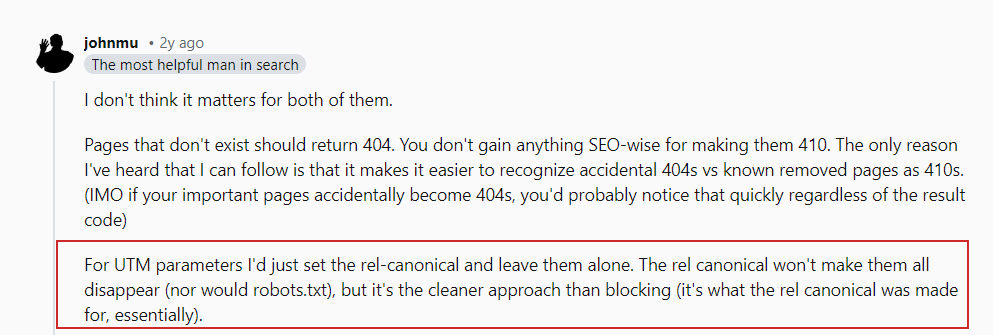
It is important to distinguish between internal filters and external tracking parameters like UTMs. UTMs are used for analytics and are typically found on external links. You should decide whether to block a parameter based on what it does to the content of the page, not simply because it is a query string.
Restricting PDF Access
If your site hosts a large volume of brochures or guides in PDF format that you do not want appearing in search, you can use a rule that targets the.pdf extension at the end of the URL. However, be mindful that this will not block URLs that have additional parameters after the.pdf extension or those using uppercase.PDF.
If the goal is to keep the file accessible but hidden from search, a "noindex" HTTP header is a better choice than a robots.txt block, as the latter prevents Google from ever seeing the noindex instruction.
Blocking Specific Directories
Certain areas of a site, such as API endpoints or form submission paths (e.g., /form/submissions/), should never be crawled. When blocking a directory, you can simply list the path. A key caution here is the trailing slash. Blocking "/form" without a slash might accidentally block a page called "/form design examples/".
Handling User Account Areas
Account pages, order histories, and profile settings are private and provide no value to the public web. However, you might still want the main login page (/myaccount/) to be indexable so users can find it. By combining "Allow" for the main page and "Disallow" for the directory, you can keep the entry point visible while blocking the private subpages.
Filtering Non Rendering JavaScript
Not all JavaScript is created equal. Scripts used for tracking or ads do not help Google understand your content. You can block these to save resources, but only after confirming they aren't required for rendering the page. If you block a script that Google needs to see the content, you may see a drop in rankings because the bot cannot "see" the page as a user does.
Controlling AI Bots and Scrapers
The modern web requires a nuanced approach to AI. There is a difference between a bot that trains a model (LLM training) and a bot that retrieves a page to show a user in real time (AI search). Some publishers block training bots to prevent their data from being used without attribution, while others allow it to increase the likelihood of being mentioned in AI responses.
It is important to realize that robots.txt is a request, not a lock. Some crawlers simply ignore these rules. blocking a training bot does not guarantee your content won't end up in a dataset if it was scraped via other means.
Expert Interpretation: This is a business decision, not just a technical one. I suggest consulting with stakeholders to decide if the trade off of "potential AI visibility" is worth the "loss of exclusive data control."
Comments
Comments are reviewed before they are published. Links are not allowed inside comments.