Managed WordPress Can Quietly Limit AI Crawl Access
/ 6 min read

Summary
A practical view on Managed WordPress Can Quietly Limit AI Crawl Access, focused on the signal to inspect, the risk to avoid, and the decision it should change.

Why This Matters for Your SEO Strategy
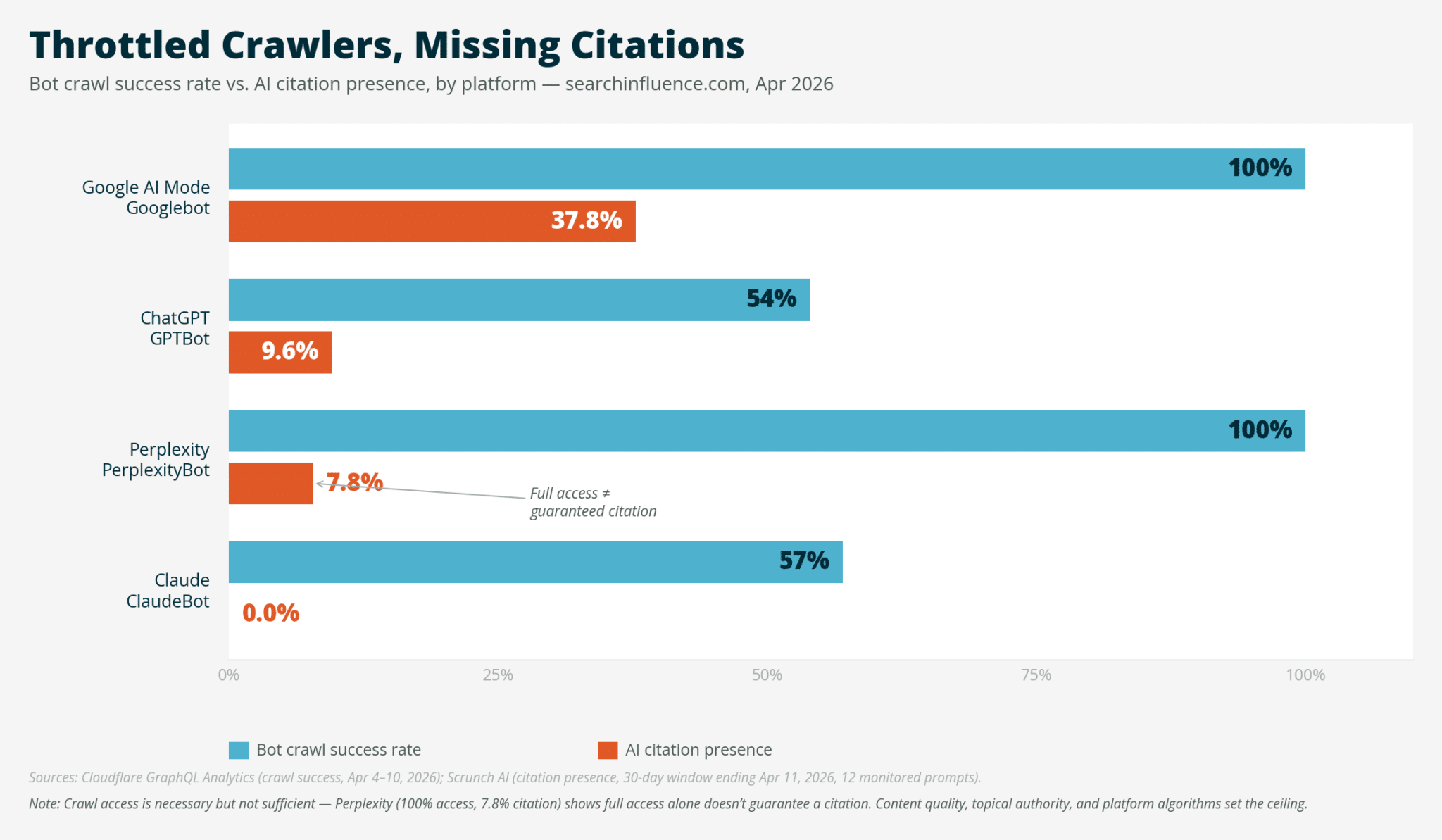
Imagine this: Your SEO metrics look perfect. Google Search Console shows no errors, traffic is steady, and indexing is strong. But when you check AI citation data through tools like Scrunch, you notice a strange pattern. Google AI Mode has 37.8% presence, while ClaudeBot shows 0%. How can identical content be treated so differently? The answer lies in something invisible: your hosting platform's bot policies.
AI search citations are shaping how users find information today. If your content isn't being crawled by major AI platforms, it's not being cited, and that means missed opportunities. The key is understanding where your site's access is being blocked, and how to fix it.
What 7 Days of Cloudflare Logs Revealed
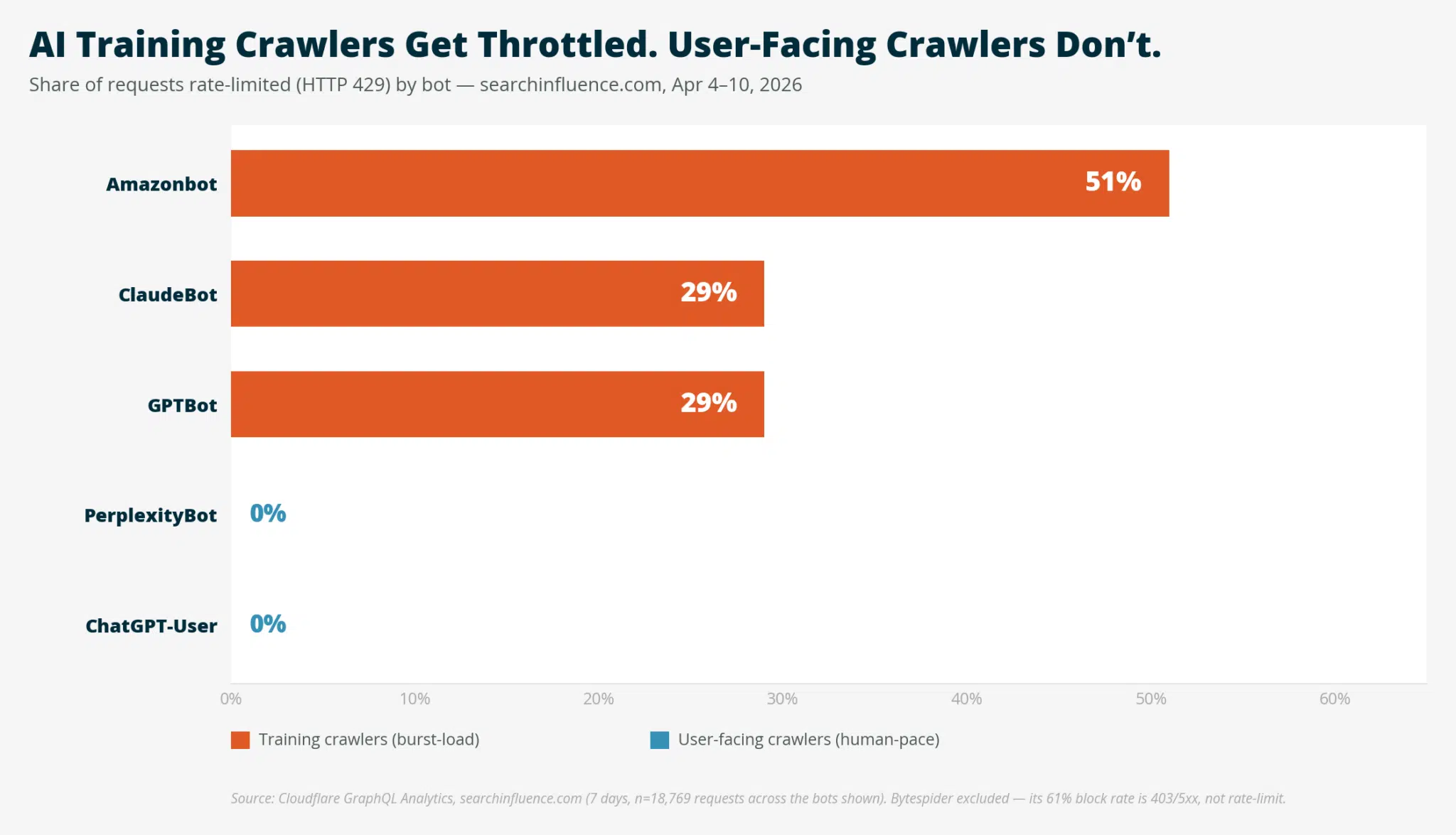
When I analyzed Cloudflare logs for searchinfluence.com, the numbers were striking. Over seven days, 29,099 bot requests came in, with 65.8% being AI crawlers. The breakdown was telling: training crawlers like Bytespider were blocked at 61%, while user facing crawlers like Googlebot saw no issues. This wasn't random, it was a deliberate policy. The same pattern also shows up in Shares Crawl Timing Ranges, where the practical question is how the signal becomes visible.
Cloudflare's data showed that AI training crawlers consume far more resources than they return. Hosting platforms are now implementing rate limits to protect server performance. But this creates a problem for SEO: if your content isn't being crawled, it won't be cited. The challenge is identifying where these blocks are happening in your stack.
Where We Looked First, And Why We Were Wrong
Suspect 1: Solid Security's HackRepair Default Ban List
Our first thought was a default bot blocklist in a security plugin. We toggled it off and monitored the results. But the numbers didn't change, some bots even spiked. This suggested the block wasn't coming from a plugin we could easily control.
Suspect 2: Solid Security's Other Firewall Subsystems
Next, we checked firewall logs for brute force attempts. While we saw many /wp login.php lockouts, there were zero entries for ClaudeBot or GPTBot. This indicated the block wasn't happening at the application layer.
Suspect 3: Sucuri Cloud WAF
We confirmed our Sucuri subscription was active, but the headers showed no x-sucuri id. This meant Sucuri wasn't in the request path. The subscription existed, but the activation never happened, a classic case of misconfiguration.
Suspect 4: Cloudflare Itself
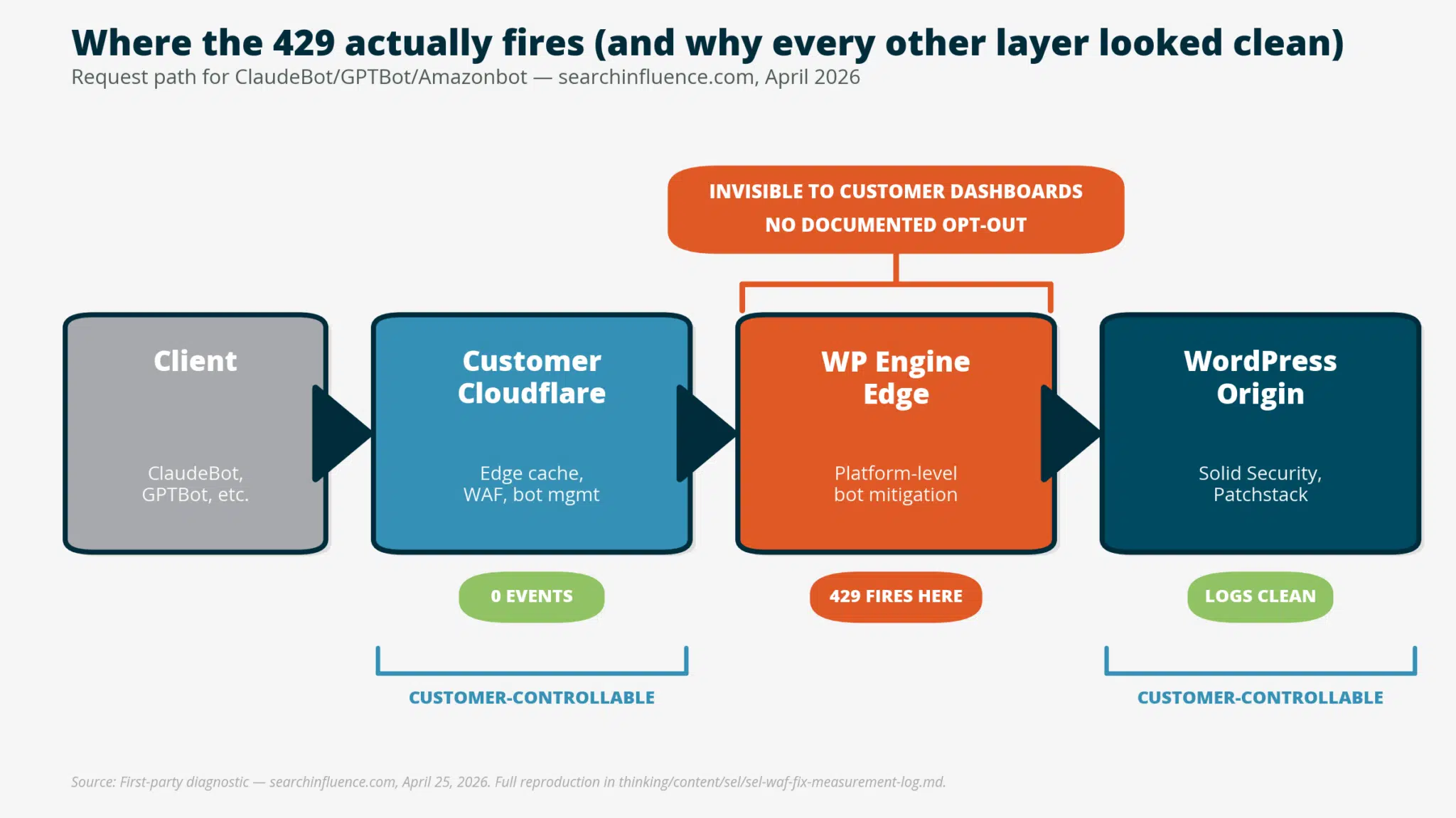
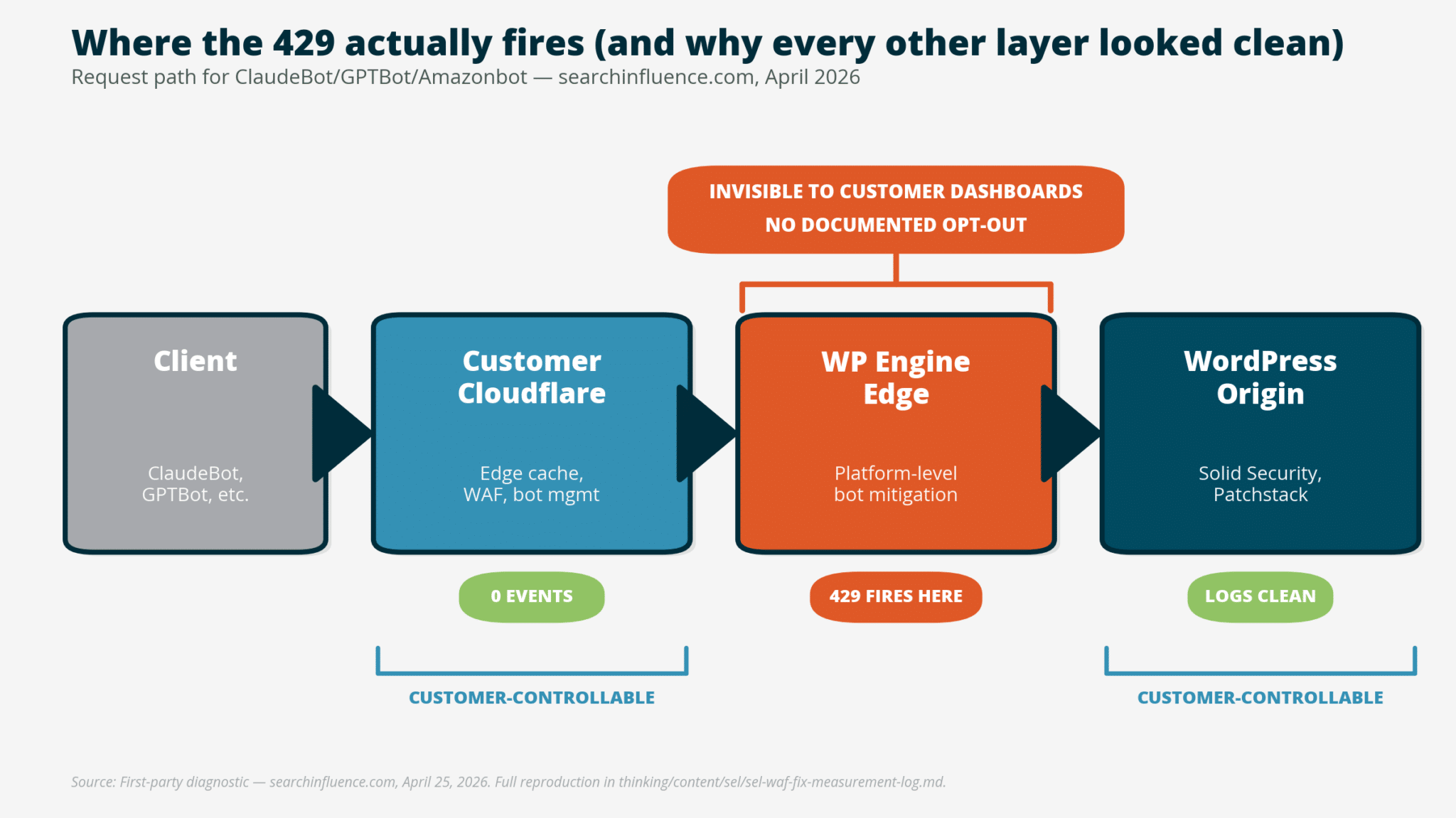
Initially, we thought Cloudflare was the culprit because the cache status was dynamic/bypass. But closer inspection showed Cloudflare wasn't taking any security action on ClaudeBot. The block was happening at a deeper layer, one we hadn't considered.
The Reproduction Test That Changed Everything
The breakthrough came when we ran a simple test: 60 fast curl requests with a ClaudeBot UA against three paths. Every request returned 429, a clear rate limit. But when we used a browser UA, all requests returned 200. This proved the block was UA based, not path or rate based.
The headers told the story: x-powered by: WP Engine. We were on a managed host, and the block was happening at the hosting platform level. This was a critical realization, the issue wasn't in our plugins or WAFs, but in the infrastructure itself.
The Bot by Bot Fingerprint
When we tested other AI bot UAs, the pattern was clear. The blocklist was outdated, targeting training crawlers from mid 2024. Older UAs like CCBot were allowed, which meant the policy wasn't perfect. But the key insight was that the block was happening at the platform level, not the application layer.
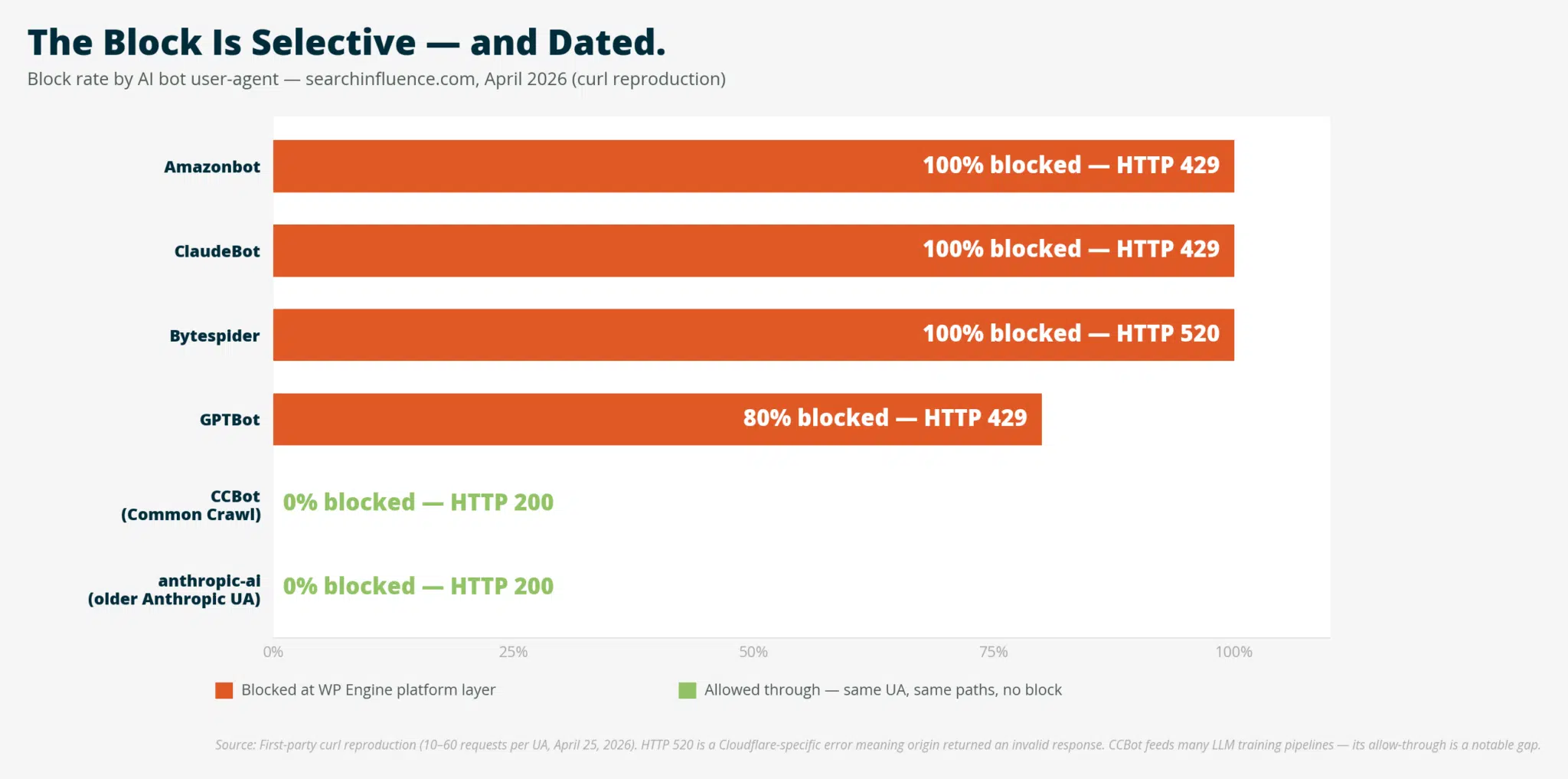
Cache headers showed the issue: WP Engine's edge cache returned 200 for ClaudeBot requests, but 429 for cache misses. This explained the Cloudflare data, 1,054 cache hits vs. 608 cache misses in 24 hours. The block was a silent killer for AI citations.
Why This Is Hard to Find
WP Engine's own documentation is a red flag. Their support page says, "Further information cannot be provided around our firewall, as this can compromise its secure integrity." This opacity is problematic, customers can't see or control the rules affecting their site.
Even more concerning is the lack of customer facing controls. While the Web Rules Engine allows some customization, it doesn't override platform level rules. This means the block is happening at a level most users can't reach, a silent barrier to AI search visibility.
What WP Engine Confirmed
When we reached out to WP Engine support, they confirmed the block was intentional. They explained it's a default policy to protect customers who don't need AI bot traffic. But the issue is the lack of transparency, customers should have a way to opt in without escalating to product engineering.
The support agent mentioned an "exceptional use case" escalation path, which is exactly what SEO professionals need. If your content is being cited by AI platforms, this policy is silently costing you visibility.
What to Do Once You Know
Escalate to Product Engineering
If you're on WP Engine, the first step is to escalate the issue. SEO and AI search visibility are exactly the kind of cases that need special attention. While it's not a self service toggle, it's a documented escalation path.
Allowlist
The Web Rules Engine lets you allowlist UAs at the site level, but it doesn't override platform rules. This is useful for bots not on the platform list (like CCBot), but not a fix for the ones that are.
Move to a Host That Doesn't Impose This
If escalation goes nowhere, consider switching hosts. Kinsta and Pressable both allow AI crawler access to customers. In 2026, AI search visibility is a strategic priority, treating it as optional is like ignoring organic search in 2008.
Accept the Block as a Deliberate Policy
Some companies may choose to stay out of AI training data. If you're in that camp, factor it into your AI search expectations. But don't keep running WAF audits that miss the real issue, the block is invisible, and the citation absence shows up months later.
The Citation Correlation
The data is clear: where AI bots can access your site, they cite it at meaningful rates. Googlebot's 100% access correlates with 37.8% citation presence, while ClaudeBot's 57% access results in 0% citations. This suggests crawl access is the floor, not the ceiling.
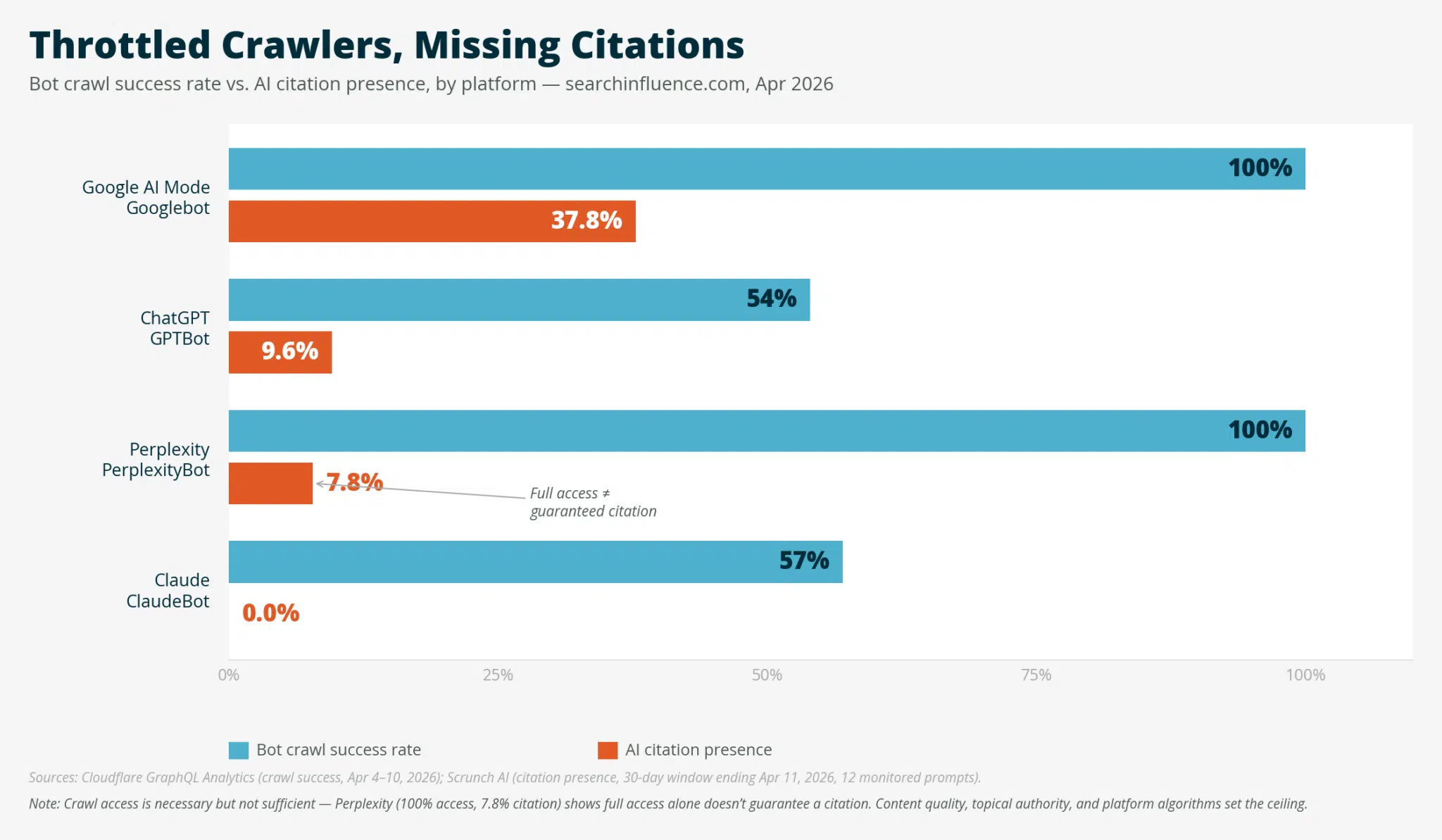
Perplexity is the wrinkle, 100% access but only 7.8% citations. Full access alone doesn't guarantee citation, but the absence of access is decisive. This reinforces the need to check your crawl access before optimizing content quality.
Caveats and Considerations
This is a single site case study, so the numbers are specific to our situation. AI citation is multi factor: content quality, topical authority, freshness, and schema all matter. Crawl access is the floor, not the whole game.
Bot UAs can be spoofed, 100% of our "ClaudeBot" traffic came from non Anthropic IPs. The host level block is doing the right thing for those impostors. But for legitimate crawlers, it's a silent barrier.
WP Engine's defaults aren't malicious, they're protecting customers who don't need AI bot traffic. The issue is the opacity, not the intent. If you want access, you need a way to say so without escalating to product engineering.
What You Should Do Next
If you're on WP Engine, run the diagnostic above. If the curl test shows the same pattern, you've got the same issue. Open a ticket and see where that goes, or switch providers. If you're on a different managed host, run it anyway. The diagnostic takes three minutes.
If you're spending months on content updates and schema markup while a default on platform setting is silently blocking crawlers, you're optimizing the ceiling of a building with no floor. Stay proactive, your AI search visibility depends on it.
Comments
Comments are reviewed before they are published. Links are not allowed inside comments.